How do I set up direct debit for my invoices?
Step 1 — Log in and go to Home
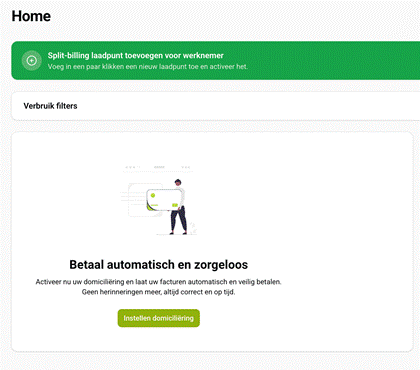
Log in to mijn.wattify.be using your own email address. Go to the ‘Home’ menu and scroll down until you see the ‘Pay automatically and hassle-free’ tile. Click on the ‘Set up direct debit’ button.
Step 2 — Information screen
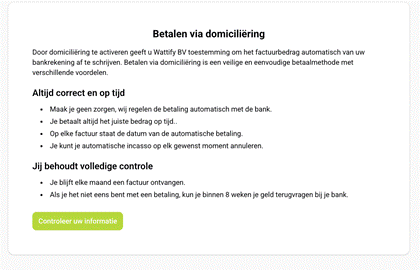
You will then see a brief information message explaining how direct debit payments work, including your rights (such as requesting a refund within 8 weeks). Click on “Check your details” to continue.
Step 3 — Complete the SEPA Direct Debit authorisation
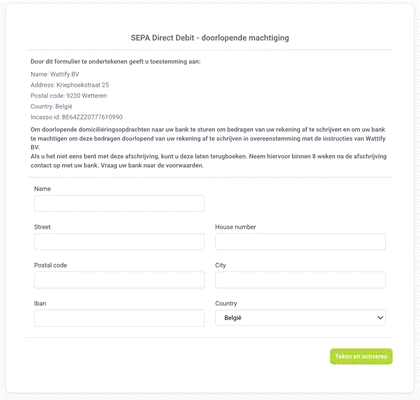
On the SEPA Direct Debit form, enter your name, address and IBAN, then click on “Sign and activate”. Once this has been confirmed, the direct debit will be active and your next invoices will be automatically debited from the specified account.
I can’t find the button / I don’t have a charging site
The setup wizard on the Home page only appears when at least one charging site or charging point is linked to your account. Can’t see the tile? First, check whether a charging site is linked to your account. If this isn’t the case, or if the button is still missing, please contact support@wattify.be so that we can look into this for you.
Related articles
Did this answer your question
Thank you for your feedback
Did not find an answer?
Our team is just an email away and ready to answer your questions